Payment
Summary: XBRUSH uses a credit-based billing system, and the pricing screen sells four separate things — a subscription (monthly credit refill), a one-off credit purchase, a storage add-on, and team packs (extra credits plus a seat). Billing currency is set automatically by region (KRW for Korea, USD for international), and payments are processed via Stripe. Annual billing comes with a 20% discount.
What Are Credits?
Credits are the billing unit used when performing AI tasks in XBRUSH, such as generating images or videos. The number of credits deducted varies depending on the engine, the resolution, and how many outputs you request. You can replenish credits through a subscription or by purchasing them directly.
How much does a job cost?
| Task | Approximate cost |
|---|---|
| Image generation | About 2 credits per image — 4 images with Z-Image Turbo costs 11.2 credits |
| 5-second video | Tens of credits per clip, varying widely by engine and resolution |
| Apps tools | Shown on the run button — Background Removal reads Remove Background −10 |
The number on the button is the number that counts. Workspace, Apps, and Open Studio all show the exact cost on the generate/run button before the job starts. Use the table above as ballpark guidance only, and read the button for the engine you actually selected.
Watermarks by Plan
| Output | Free plan | Paid plans |
|---|---|---|
| Images | No watermark | No watermark |
| Videos | A small watermark is embedded | No watermark |
Upgrading to any paid plan removes the video watermark entirely.
Currency & Payment Region
XBRUSH automatically detects your region and displays prices in the appropriate currency:
| Region | Currency | Payment Processor |
|---|---|---|
| Korea | KRW (₩) | Stripe |
| International | USD ($) | Stripe |
No manual selection is required — currency is set automatically when you access the payment screen. If you believe the wrong currency is shown, try clearing your browser cache or contact support.
Go to the Payment Screen
- Click the credits icon in the upper left to open the purchase popup.
Payment Overview
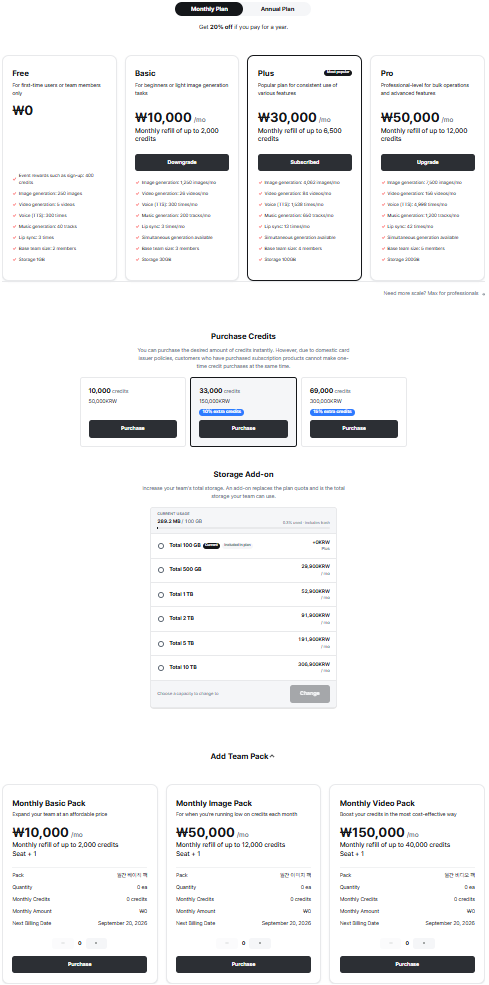
The pricing screen from top to bottom. It holds four separate products, and they are bought independently of one another.
The screen is one long page with four sections. Knowing which one you need saves you buying the wrong thing:
| Section | What it sells | Buy it when |
|---|---|---|
| 1. Subscription | A monthly credit refill, storage, and team seats | You generate regularly and want a predictable monthly amount |
| 2. Purchase Credits | A one-off block of credits, no recurring charge | You ran out mid-month and just need more credits now |
| 3. Storage Add-on | A larger total storage quota for the team | You are keeping a lot of output and hit the plan's storage limit |
| 4. Team Pack | Extra monthly credits and one extra seat | Your team grew, or one plan's monthly credits are not enough |
Sections 1 and 4 are recurring; sections 2 and 3 change what you hold rather than what you generate each month. All four are visible on the same page, so scroll rather than assume the top of the screen is all there is.
1. Subscription Plans
The toggle at the top switches between Monthly Plan and Annual Plan — "Get 20% off if you pay for a year." Your current plan shows Subscribed; the others show Upgrade or Downgrade.
| Plan | Price / month | Monthly credit refill | Storage | Base team size |
|---|---|---|---|---|
| Free | ₩0 | Event rewards only (up to 400 credits shown on the card) | 1 GB | 2 members |
| Basic | ₩10,000 | up to 2,000 | 30 GB | 3 members |
| Plus | ₩30,000 | up to 6,500 | 100 GB | 4 members |
| Pro | ₩50,000 | up to 12,000 | 200 GB | 5 members |
Each card also translates its credits into rough output volume — Basic reads "1,250 images/mo · 26 videos/mo · 200 music tracks/mo," and the figures scale with the plan. Simultaneous generation (queuing more than one job at a time) is available from Basic upward and is not on Free.
Below the cards, "Need more scale?" links to an enterprise inquiry for volumes beyond Pro.
💡 The plan sets your monthly refill, not a hard cap. If you run out before the refill date, sections 2 and 4 are the two ways to top up — one-off or recurring.
2. Purchase Credits
A one-off block of credits with no recurring charge. Larger blocks carry bonus credits.
| Block | Price | Bonus |
|---|---|---|
| 10,000 credits | ₩50,000 | — |
| 33,000 credits | ₩150,000 | +10% extra credits |
| 69,000 credits | ₩300,000 | +15% extra credits |
⚠️ You cannot hold a subscription and buy one-off credits at the same time. The screen states this directly: because of domestic card issuer policies, customers who have purchased a subscription product cannot make a one-time credit purchase alongside it. If you are subscribed and need more credits, use a Team Pack (section 4) instead.
3. Storage Add-on
Storage holds the images and videos you have generated. The panel shows your current usage against your quota at the top — for example 269.2 MB / 100 GB — followed by the tiers you can move to.
| Tier | Price / month |
|---|---|
| 100 GB | Included in plan (Plus) — +₩0 |
| 500 GB | ₩29,900 |
| 1 TB | ₩52,900 |
| 2 TB | ₩91,900 |
| 5 TB | ₩191,900 |
| 10 TB | ₩306,900 |
⚠️ An add-on replaces the plan's storage quota — it is not added on top of it. Each row is a total, and the label on screen says so: "An add-on replaces the plan quota and is the total storage your team can use." Moving a Plus team (100 GB) to the 500 GB tier gives that team 500 GB in total, not 600 GB.
Select a tier and press Change. The tier already in effect is marked Included in plan and cannot be selected again.
4. Team Pack
Team packs are the recurring alternative to a one-off credit purchase, and the only top-up available while you hold a subscription. Each pack adds monthly credits and one team seat (Seat + 1), so they scale headcount and generation volume together.
| Pack | Price / month | Monthly credit refill | Seats |
|---|---|---|---|
| Monthly Basic Pack | ₩10,000 | up to 2,000 | +1 |
| Monthly Image Pack | ₩50,000 | up to 12,000 | +1 |
| Monthly Video Pack | ₩150,000 | up to 40,000 | +1 |
Each card carries a quantity stepper — buy several of the same pack at once — and shows what you are about to commit to before you press Purchase:
| Field | What it shows |
|---|---|
| Pack | Which pack the card is for |
| Quantity | How many you are buying, set with the − / + stepper |
| Monthly Credits | Total credits the selected quantity adds each month |
| Monthly Amount | Total recurring charge for the selected quantity |
| Next Billing Date | When the first charge lands |
💡 Packs stack with your plan rather than replacing it. A Plus team (6,500/mo) that adds one Monthly Image Pack refills at 18,500 credits a month and gains a fifth seat.
Payment Methods
Payments are processed through Stripe. On the Stripe checkout screen, Korean users may additionally see local payment options:
- Credit/Debit Card — Visa, Mastercard, and other major cards
- Naver Pay — Available for Korean users
- Kakao Pay — Available for Korean users
The options actually presented depend on your region and the currency of the transaction; the checkout screen is authoritative.
Credit Card Payment
You will be directed to the secure payment page. Enter your card number, expiration date, CVC, and billing address to complete the payment. All major credit and debit cards are accepted.
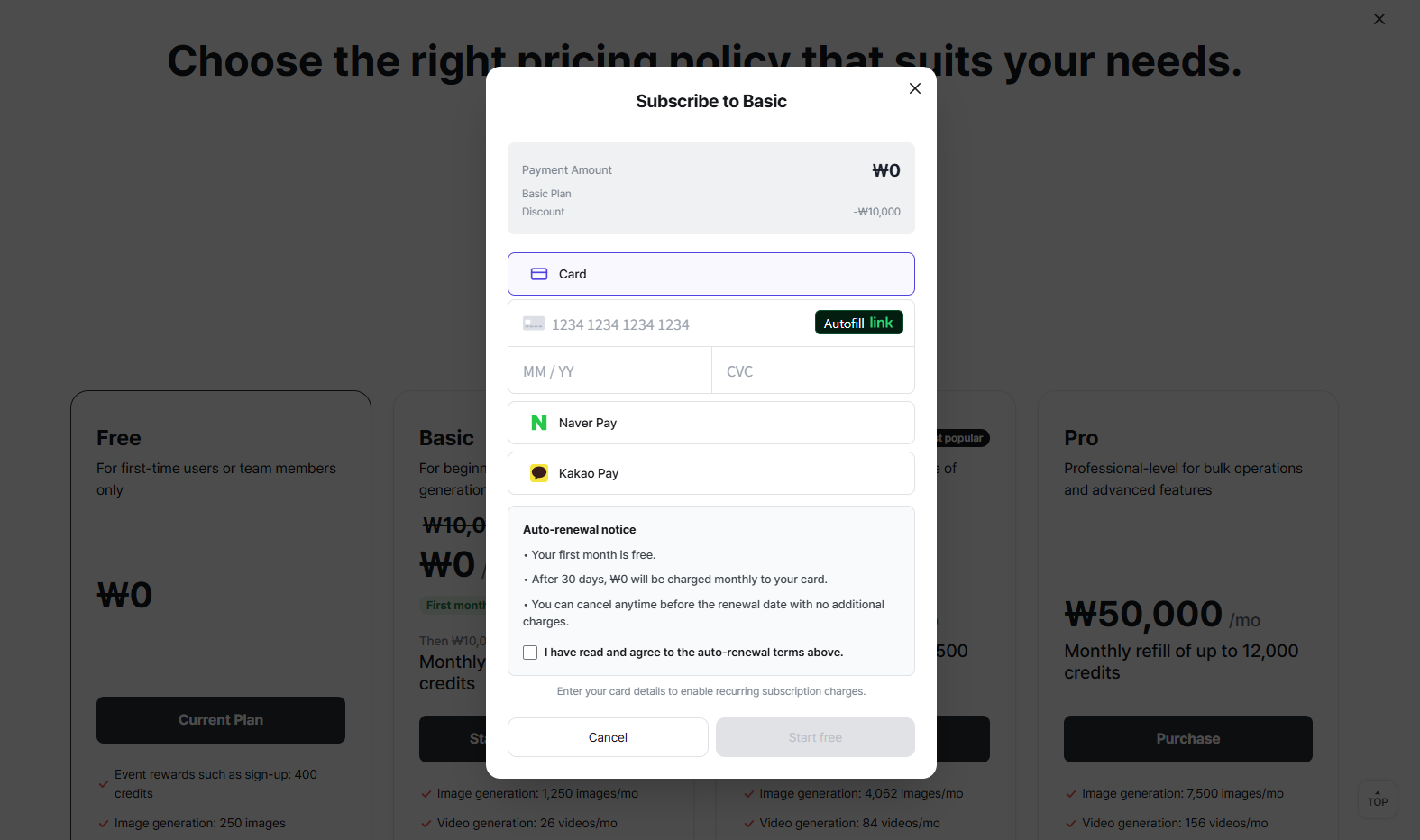
Payment screen.
Subscription Information
- You can view your current subscription details in the purchase popup.
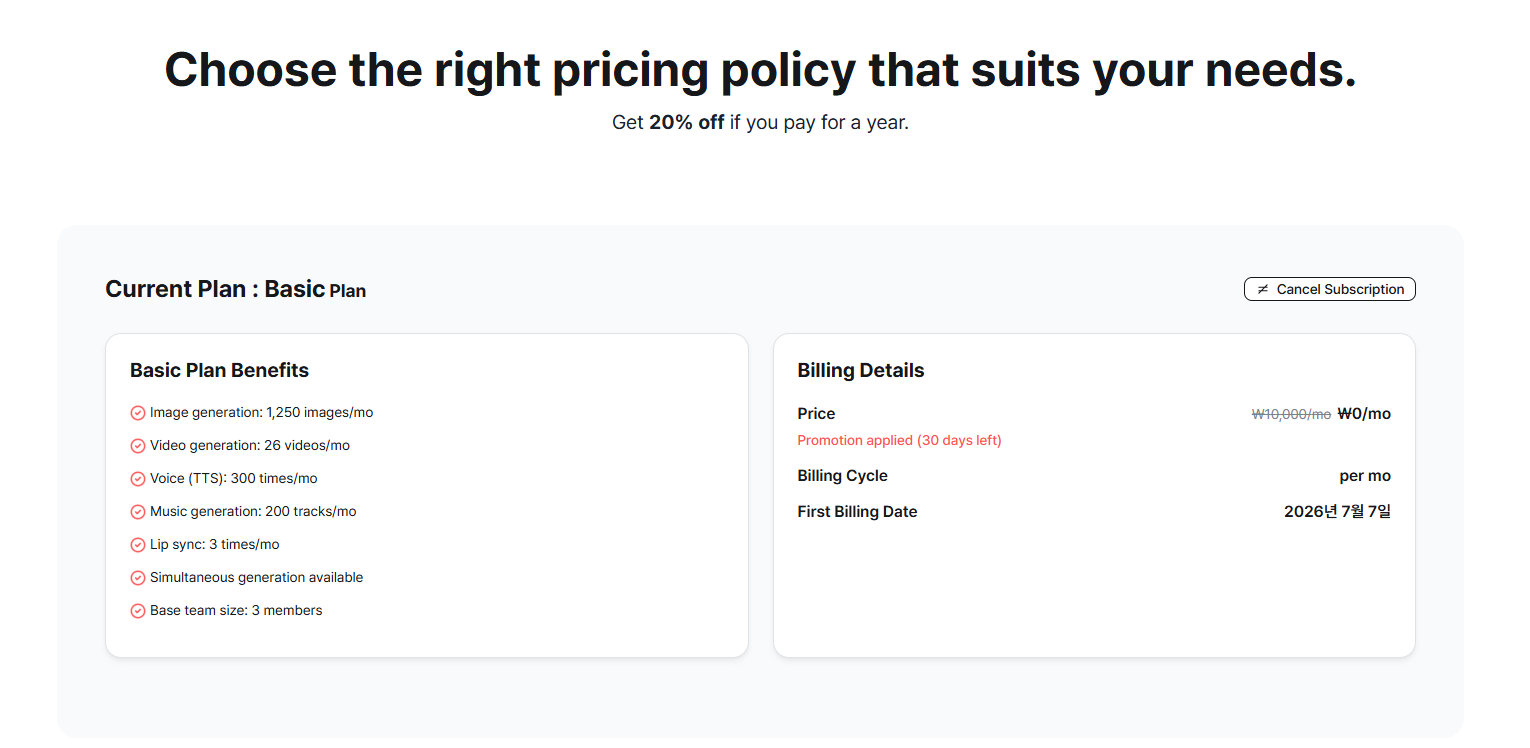
Subscription information.
Manage Your Subscription
- You can check your active subscription and upgrade or downgrade your plan at any time.
- When changing a subscription, you will be offered two options: apply the change immediately, or apply it from the next billing date.
- Immediate changes take effect right away.
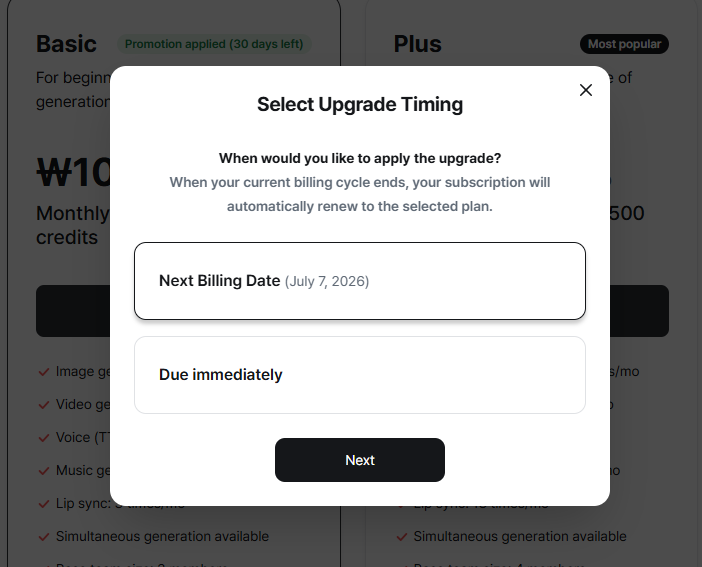
Subscription change (upgrade).
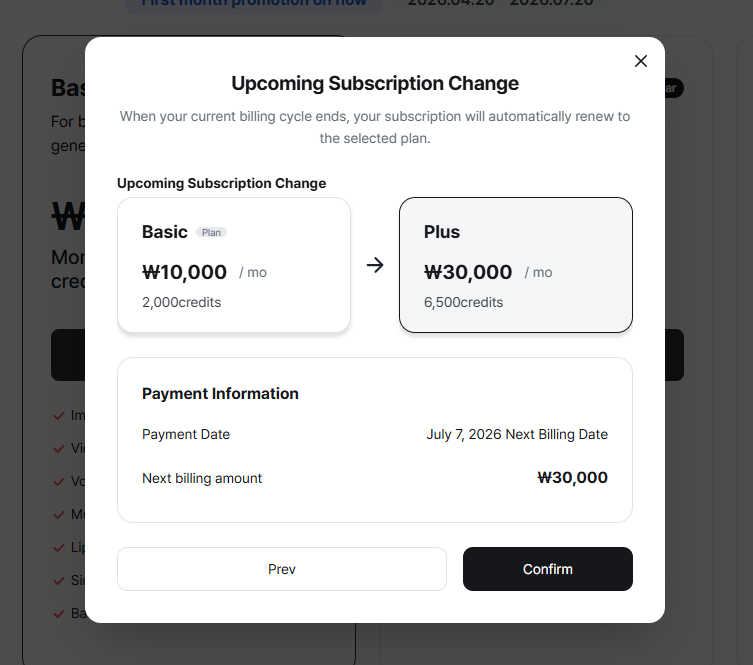
Subscription change (upgrade).
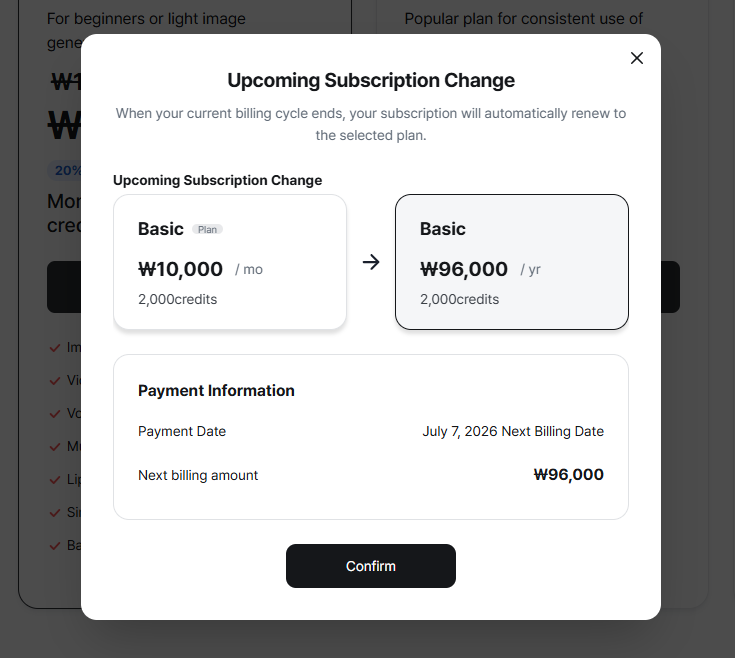
Subscription change (upgrade).
Payment Notifications
- Recurring subscription payments are processed automatically. You will be notified by email before each automatic payment is charged.
Coupons
To apply a discount, use the coupon input field on the payment screen and enter your coupon code. Each coupon has its own terms (e.g., first-time use only, expiry date). Contact support if your coupon is not being accepted.
Refund Policy
Refunds are only available within 7 days of payment and only if no credits have been used. Even consuming a single credit makes the purchase ineligible for a refund. To request a refund, contact support@xbrush.ai with your payment date and amount.